Join
Alice on a progressive pot journey through Wonderland! You could win
THOUSANDS of £s on our new Alice in Wonderland slot!
Spin for a win and smile like a Cheshire cat!
Bet
on the outcome of five spinning reels. Match 3 or more icons on a win
line to win a cash payout. Payouts increase depending on the number of
matching symbols you have.
Winnings are credited to your account
immediately. If you lose, by having insufficient matching icons on a win
line, you will lose your stake amount.
1.
The stake is fixed for this game, but you can select how many win-lines
to play with by either pressing the Lines button or the line indicator
buttons (colour coded 1-20, situated on each side of the reels). You
have the opportunity of choosing up to 20 win lines per game. Win lines
will always pay from left to right only. The icon on the far left of the
win line will act as a point of reference for finding at least two
further matching icons as you move along the line towards the right.
Each Win line has one unit of the stake associated with it, each line
can win separately in any single game. If you ignore selecting either
the Lines button or the line indicator buttons, then the default setting
for the game will be used, which is all 20 lines.
Each
click of the Lines button moves the line selection from 1 through to 20
respectively. Each click of the lines button adds one line to the
selection. If you continue to click the lines button after 20, the cycle
starts again at 1 line. The win line(s) and reel positions illuminate
with each press of the button. Animations highlight each reel position
and a “pathway” is shown making line selection clear and easy.
To
make things even clearer each line its own progressively colour coded
button/indicator; starting with 1 (red) through to 20
(violet/purple).
2. Click the Spin button to spin the reels
to start the game. When the reels stop, any wins will be registered
automatically and added to your account (if you collect the win).
There are 2 special “no lose” feature games which,
when activated, allows you a chance to win between 5X – 10 000X the
stake value of the line that triggered the feature. All you have to do
is play a mini-game by making simple selections.
The Feature Game
you will play depends upon how many feature Icons are consecutive on an
activated win-line:
* 3 feature Icons – Play: Regal Hi Lo
* 4
feature Icons – Play: Alice’s Finders Key-pers
The stake value
of the line that was used to trigger the feature will be saved. Any
winnings in the feature will be multiplied by the triggering line-stake
amount, giving the total win for the feature.
The stake value of
the line that was used to trigger the feature will be saved. Any
winnings in the feature will be multiplied by the triggering line-stake
amount, giving the total win for the feature. The feature plays where
the reels normally are
How to Play the Special Features
1. Regal
Hi Lo – In this game you win money by making correct Hi Lo
selections: A Butler enters the feature screen and stops. He then
reveals a card; now you must select weather the next card to be revealed
will be higher or lower than the card displayed by selecting either the
Hi or Lo button respectively. When you have made your selection, a
second butler emerges on screen and reveals the next card, standing to
the left of the 1st card.
* If you make a correct selection; you
receive a win multiple for that choice. The amount will be shown in the
winnings display, at the bottom of the feature screen. Keep making Hi/Lo
selections in the same manner until you make an incorrect selection.
Note:
If a Joker card is drawn as a result of a High/Low choice - you
automatically win that specific selection. The next Hi/Lo selection will
however yield a "lose" result.
* If the next card to be drawn is
the same value card as the one as the one currently displayed; the
winning card is decided by suit hierarchy - hearts, clubs, spades,
diamonds (in ascending order). For example - If the card shown 5 of
Clubs and you choose Hi and the 5 of Spades is drawn; You will win the
selection as spades is higher on the suit hierarchy list.
* If
you make an incorrect selection; the feature ends and the final win
multiple shown in the Winnings display will be multiplied by the
line-stake that triggered the feature, giving the final win amount for
the feature game.
2. Alice’s Finders Key-pers –
In this feature game you find Alice in a strange room. You will then be
prompted to select the Spin button to start the feature; now a ring of
objects spin around Alice and come to rest. The object directly in front
of Alice is the result of that spin. The result will be one of the
following objects:
• Eat Me Objects – Increase
the size of Alice; with each eat me object you will be assigned one of
various win multiples. After an “eat me” object –you will be always be
prompted to spin again. (Note: the graphical size change of Alice
corresponds to the win multiple assignment which increments as Alice
grows – The multiple displayed is seen to “count up” as Alice grows)
•
Drink Me Objects – Decrease the size of Alice; with
each drink me object you will be assigned one of various negative win
multiples. You will only get a drink me object if you have already
accrued a positive win multiple amount. The negative number will be
subtracted from your accumulated win multiplier total (it is impossible
to have a negative number total). After a “drink me” object –you will
always be prompted to spin again. (Note: the graphical size change of
Alice corresponds to the win multiple assignment which decreases as
Alice shrinks – The multiple displayed is seen to “count down” as Alice
shrinks)
• Mushroom – Will reveal either an eat
me or drink me object at random. You will only know which one it is when
the mushroom is revealed. Your multiplier total will be adjusted
accordingly.
• The Key – The key opens the door
and exits the feature. The win multiplier total achieved when the key is
revealed will be the final win multiplier for the feature. This amount
will then be multiplied by the line-stake that triggered the feature;
giving the Total Winnings for the feature game.
It is important
to understand that your multiplier total can go down as well as up;
revealing the key finalises the win multiple achieved for the feature.
Double
Up will be offered on the total win amount achieved in the single cash
play that triggered the feature (the feature win; plus any line-wins if
applicable). If double up is refused; winnings will be credited
immediately into your account.
Click
the Paytable button to view the win multiples and icon list for the
game. Payouts are shown in multiples of the winning line stake. A
minimum of three consecutive icons from left to right on an active win
line is required to win (the only exception is the scatter icon, which
is explained in its own section).
DESCRIPTON Win lines pay left to right ONLY (except scatter). Payouts are shown in multiples of the winning line stake. | Icon No. | Payout 3 Icons | Payout 4 Icons | Payout 5 Icons |
WILD ICON – Cat: Substitutes for any Icon (except scatter and Jackpot Icon). Has random multiplier attached* | 12 | * Random multiplier attached X2, X5 or X10 (see: Wild Icon Bonuses) | * Random multiplier attached X2, X5 or X10 (see: Wild Icon Bonuses) | * Random multiplier attached X2, X5 or X10 (see: Wild Icon Bonuses) |
SCATTER ICON – Mad Hatter: Win Free-Spins with enhanced reel set. (see: Scatter to Free Play section) | 11 | Play Scatter Bonus Round -Free-spins following | Play Scatter Bonus Round -Free-spins following | Play Scatter Bonus Round -Free-spins following |
FEATURE ICON – Twins: (see: Special feature section) win cash by playing one of two mini games | 10 | Play Feature Game | Play Feature Game | Play Feature Game |
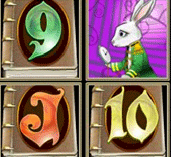
Progressive Jackpot – Alice – Win one of 3 Jackpots | 9 | Mini Jackpot | Midi Jackpot | Maxi Jackpot |
(Animated Icon 3) Rabbit | 8 | 30 | 60 | 120 |
Animated Icon 2) Caterpillar | 7 | 20 | 50 | 100 |
Animated Icon 1) Queen | 6 | 15 | 25 | 35 |
Ace | 5 | 12 | 20 | 30 |
King | 4 | 10 | 15 | 25 |
Queen | 3 | 6 | 12 | 18 |
Jack | 2 | 5 | 10 | 15 |
10 | 1 | 2 | 3 | 6 |
9 | 0 | 1 | 2 | 5 |
It
is possible to add or remove specific lines not only by pressing the
lines button but also by selecting line indicators individually
(labelled 1-20 and colour coded) which perform as buttons and can be
used to add or remove win-lines from the selection. The individual line
indicator buttons can click on (illuminated), or click off (not
illuminated):
– To remove a selected line, click on the
respective line number.
– To add a line, click on the respective
line number.
If you have customised the win lines selected (by
individually adding/removing win lines), and then click the lines
button; all lines of a lesser number than the highest line number
selected will be switched on plus the next win line up in sequence (as
detailed in the beginning of step 2) .
For example, if all win
lines up to 10 were switched on, and then 4, 5 and 6 were turned off,
and then the ‘lines’ button was pressed, lines 1 - 11 would ALL be
turned on.
The following is a chart of the 20 win-line paths
available for selection. When a win line is selected it is accompanied
by an animation which clarifies its position, as described previously.
[image3:center:listing]
The 20 win line Paths
NOTE: Win lines pay left to right
ONLY (except Scatter Icon).
Win Line Indicators
All line
wins will be displayed in local currency in a coloured box by the
respective line indicator.
The
Bet Max button is a feature which enables bigger spending customers to
place large bets quickly. If you click the Bet Max button; any
stake/lines previously set will be overridden.
PLEASE BE AWARE OF
THE FOLLOWING:
When the bet max button is selected, the stake
and lines will be set automatically as follows;
Bet Max = Maximum
stake allowed/maximum number of lines playable AND playing all lines
available.
Or put more simply;
Bet Max = Maximum stake
(example: £1000) divided by the maximum number of lines available (20),
multiplied by the maximum number of lines available per-game (20).
£1000
divided by 20 lines = £50 per line X 20 lines =£1000 total stake
per-spin.
The Auto-Spin
button is used to play more than one spin without selecting the spin
button each time. If the Auto-Spin button is selected; a pop up appears
just above the button offering various Auto-spin options: 25 spins, 10
spins, 5 spins and Cancel. Select the appropriate button on the pop-up
window that best suits your gaming requirements. Once a specific number
of auto–spins is selected, the auto–spins will begin immediately. When
the Auto-Spin is engaged, the following rules apply:
– Upon
selecting the cancel button; the pop-up Auto-Spin number selector closes
down.
– During Auto Play the Spin button changes to a Stop
button; pressing this cancels any remaining Auto Play spins.
– If
Auto Play is not stopped manually it will continue playing until the
number of max spins is reached or a game element involving user
interaction (feature or free spins) is initiated.
– Any user
interaction or winnings cancels all remaining Auto Play functionality.
The
Auto-spin will not be available in certain regions due to current laws.
If the Auto-Spin is not available, the game will have 6 buttons on the
cabinet only.
With any win, you
will be offered the opportunity to gamble it. With the gamble feature
you can either double or quadruple a win if you correctly guess the
colour or suit of the next card to be revealed respectively.
In
the Feature, you now have 3 options:
1. Select/click one of the 4
suit buttons (which pay X4). A single card will be drawn. If you are
correct, the current win will be multiplied by X4. If you are incorrect,
you lose the win.
2. Select/click one of the 2 suit colour
buttons, Red (Diamonds/Hearts) or Black (Spades/Clubs), which pay X2. If
you are correct, the current win will be multiplied by X2. If you are
incorrect, you lose the win.
3. You may click the collect button
at any time to collect the win.
You may gamble your win until you
either lose or reach the maximum win, which is £10 000 (variable by
game operator). You may collect the win at any time. The talkback area
informs the player of the maximum win.
You are not permitted to
gamble a win if the successful result would exceed £10 000 (or the
amount specified by the game operator).
When is the
Gamble option offered?
The Gamble option will be offered
on the total amount of winnings achieved in a single cash spin/play.
This means that if you get Line wins, free-spins and a Special Feature
game in a single spin; each will be played out in turn, then the gamble
option will be offered on the total amount won in the cash spin/play.
After
any win, the Gamble button will blink; either select the option to
gamble and money credited into your account will be used to play the
Gamble Feature, or continue to resume normal play and click ’spin’.
Note:
If you lose on the Gamble Feature, you will win nothing.
If 3 or more scatter icons appear ANYWHERE
in the result of a game, the free play feature is triggered. The number
of lines selected for play does not affect the way the scatters are
triggered; the scatter icons can appear in any of the 15 visible reel
positions. The Wild Icon does not count as a scatter Icon.
What
happens if I get 3 or more Scatter Icons in a single game?
If you
get 3 or more scatters in the result of a single game, the scatter
icons will illuminate with an animation. Now you move on to the Scatter
Bonus Round to finalise the details of the free spin feature.
Playing
the Scatter Bonus Round
You will now see that the 15
reel position boxes will have question marks upon them.
Click on
boxes one at a time until you reveal the “Start Free Spins” box (which
automatically stops the scatter bonus round).
Inside the boxes
are:
– A number of Free-spin quantities (available range: 1–25)
Free
spin quantities will be added together to give a grand total of spins
for the feature. For example: 2 spins 15spins 3 spins = 20 free spins
for the feature.
– One Start free spins
When the “start
free spins” box is revealed – the choosing period ends automatically;
the details of your free-spins will be displayed on screen in an
animation which plays over the boxes. The free spins will then begin
automatically.
Free-Spin Functionality
The free-spin reel set
is different to the reel set used in normal play. The reel set contains
enhancements that are unique to the free-spins.
* The will be no
Special Feature Icons (that lead to the mini–games) in the free-spins
reel set.
* There will be no Wild Bonus Icons, but there will be
Sticky Wild Icons which are unique to the free-spin reel set. The Sticky
Wild Icons will replace the wild cards in normal reel set.
Sticky
Wild Cards:
Appear only in the free-spin reel set. The
Sticky Wild Icons will replace the wild cards in normal reel set. Sticky
wild icons behave like normal wild cards in that they will substitute
for any icon to make the best win possible (except the Jackpot and
Scatter Icons).
In addition to this; the icon will bear a number
designation upon it which ranges from 1 – 15. The number designates how
many spins the wild card will remain in play (including the spin that
the icon appeared).
After the spin in which the icon appeared;
the icon will stick in position and the reels will move underneath the
icon during the following spin (if the number on the icon is more than
1). The number on the icon will decrease by one with each consecutive
spin until the functionality is exhausted. The icon will disappear after
the last “sticky” spin; normal free-spins resume until exhausted.
General
Rules About Free-Spins
– Free plays are free spins that
start automatically and play out consecutively until they are
exhausted.
– The talkback area will display all free spins
remaining on the left of the display. The right side will display the
total win amount generated from the free spins.
– The stake and
number of lines selected in the game that triggered the free plays will
be used for the duration of the free play period.
– If you get 3
or more scatter icons in a single spin during the free plays, the
existing free-spins will be paused, then the feature bonus round will be
played again and the extra spins achieved will be added to the previous
total; the free-spins will then begin again from the moment they were
paused with the additional spins added to the total. Extra free plays
are possible more than once in a feature.
– Free spins uses a
different reel set to normal play.
– Free spins to not count in
the countdown of auto spins; when free spins start auto spins are
cancelled.
– Free spins start spinning automatically and require
no user interaction unless free spins are won.
At the end of the
free spins a congratulations screen appears covering the game reels
which displays the amount won.
The Gamble Feature will be offered
on the total amount won on the single cash play that triggered the
free-spins (any other line/feature wins from the initiating spin will be
added the free-spin winnings total). If the win is collected; the
winnings will be credited to your account; normal play then resumes.
For a standard icon line win, you need
at least 3 consecutive icons appearing from left to right on an
activated win line (except the scatter icon). A wild icon will
substitute any standard icon except the Jackpot and Scatter, to make the
best win possible. Note: The wild Icon will substitute for a feature
Icon, but no win multiplier will be present as the feature icons trigger
a mini game that wins in its own right.
In addition to this, the
wild icon has a random multiplier value attached (X2, X5 or X10) which
is revealed during the wild card animation. This means that a win
containing a X5 wild icon would pay 5 times the standard pay table value
for the win.
Example: 4 win icons 1 wild icon (revealing X5)
=
The standard payout for 5 win icons (example X20)
Plus the X5
bonus
20 X 5 = X100 payout for the win
Example: Any 2 win
icons and 2 wild icons consecutive (left to right) on a win line would
create a payout for 4 of the “non wild” icons that created the win, plus
a x2 wild win bonus.
Note: 2 or more wild card icons being part
of a win does not further increase the bonus payout.
The Progressive Jackpot consists of a
fixed minimum amount which gradually increases by a percentage of funds
inputted into the game until it is won. When the jackpot is won, it is
reset to the "seed" amount and begins to rise again. The progressive
Jackpot icon is connected to 3 progressive jackpots. Which progressive
jackpot is won depends upon, the number of consecutive icons (paying
left to right only – no wild card substitution). Progressive Jackpots
are available in real play only; each individual current Jackpot total
is displayed above the talK–back panel.
– Mini=3 consecutive
Icons (paying left to right only)
– Midi=4 consecutive Icons
(paying left to right only)
– Maxi=5 consecutive Icons (paying
left to right only)
The Wild card Icon will not substitute for a
Progressive icon.
Winning a progressive jackpot neither
contributes to, or is affected by the daily cumulative winnings limit.
There are seven buttons on the cabinet of the
slot, they are as follows:
Button | Action |
Stake | Increases the stake in increments |
Lines | Increases the number of lines to be played per-game. (default=MAX) |
Bet Max | Instantly selects Maximum lines and stake |
Spin | Starts the game – spins the reels |
Auto | Automatically starts each game – The Spin button then becomes the stop button; which is pressed to disengage Auto spin |
Gamble | A gamble option offered on all wins - double or quadruple a win until you lose or the maximum win is reached |
Pay Table | Allows viewing of potential wins – viewed in multiples of stake. |